Rivian
- 3.1
- Rating
- 50.00K
- Installs
- Free
- Price

 Analysis by App-foxy
Rivian is a free Auto & Vehicles app from Rivian, LLC., built for people who own, follow, or are seriously considering Rivian vehicles. I approached it less like a showroom companion and more like something that has to justify a place on my phone after the excitement of a new vehicle fades. That distinction matters: an app can feel impressive during the first few days and still become irrelevant once the delivery process, initial setup, and curiosity are over.
My first impression was shaped by the app’s close connection to the Rivian ownership experience. It is not a general driving utility, a universal electric-vehicle dashboard, or a replacement for every service a driver might need. Its value comes from being tied to one manufacturer and the relationship between that manufacturer, the vehicle, and the person using it. If you drive a Rivian, that focus can feel useful. If you do not, the app is much harder to justify as a daily tool.
What the first week feels like
The first week is where the app has its strongest natural advantage. New owners usually have several small questions at once: how to stay connected with the vehicle, where to look for account-related information, how to keep track of ownership tasks, and which parts of the Rivian experience belong in the phone rather than inside the vehicle itself. Having those touchpoints gathered in one place reduces the need to remember every detail.
You May Also Like

 Google Keep - Notes and lists
Google Keep’s Quiet Growth Shows the Appeal of Simpler Notes
As mobile work gets busier, Google Keep keeps winning a simple contest: capture a thought quickly, find it later, and get on with the day.

 Blood Strike: 2.5 Anniversary
Blood Strike’s Loadouts Turn Every Drop Into a Tactical Gamble
A close look at Blood Strike’s custom loadouts: how fast access to signature weapons reshapes its battle royale rhythm, rewards preparation, and narrows the gap between fights.

 Pandora - Music & Podcasts
Pandora’s Music Is Easy to Start, but Harder to Recover
Pandora’s strength is its low-effort path from a seed to a station. Its weak spot is how much confidence it asks you to place in connection, setup, and quiet recovery.

 8 Ball Pool
 Is Built on Rivalries, Rematches, and Routine
A close look at the rivalries, rematches, shared routines, and unanswered safety questions that turn a quick pool match into a persistent mobile community.

 Samsung Music
’s Quiet Strength Is Playing What You Already Own
Its reach comes less from spectacle than from dependable access to a personal library. That simplicity is both the app’s strongest retention engine and its ceiling.

 AccuWeather: Weather Radar
AccuWeather Review: A Quick, Clear Forecast for Everyday Decisions
For everyday plans, the best forecast is the one you can understand quickly. AccuWeather makes rain timing, radar, and local conditions easy to act on, with a few trade-offs.
More From Our News Desk



I also found the manufacturer-specific approach easier to understand than a collection of unrelated automotive apps. A general navigation app may be better for directions, a charging network app may be necessary for a particular provider, and a service app from another company may handle a separate task. Rivian’s app is different because it represents the owner-to-vehicle connection rather than trying to be the entire driving ecosystem.
That distinction is important for expectations. I would not install it hoping for a complete replacement for mapping, charging discovery, roadside planning, or vehicle maintenance software from every possible provider. I would install it because I wanted a direct mobile companion for a Rivian vehicle. The app makes the most sense when the phone is being used as an extension of ownership, not as a universal tool for any car.
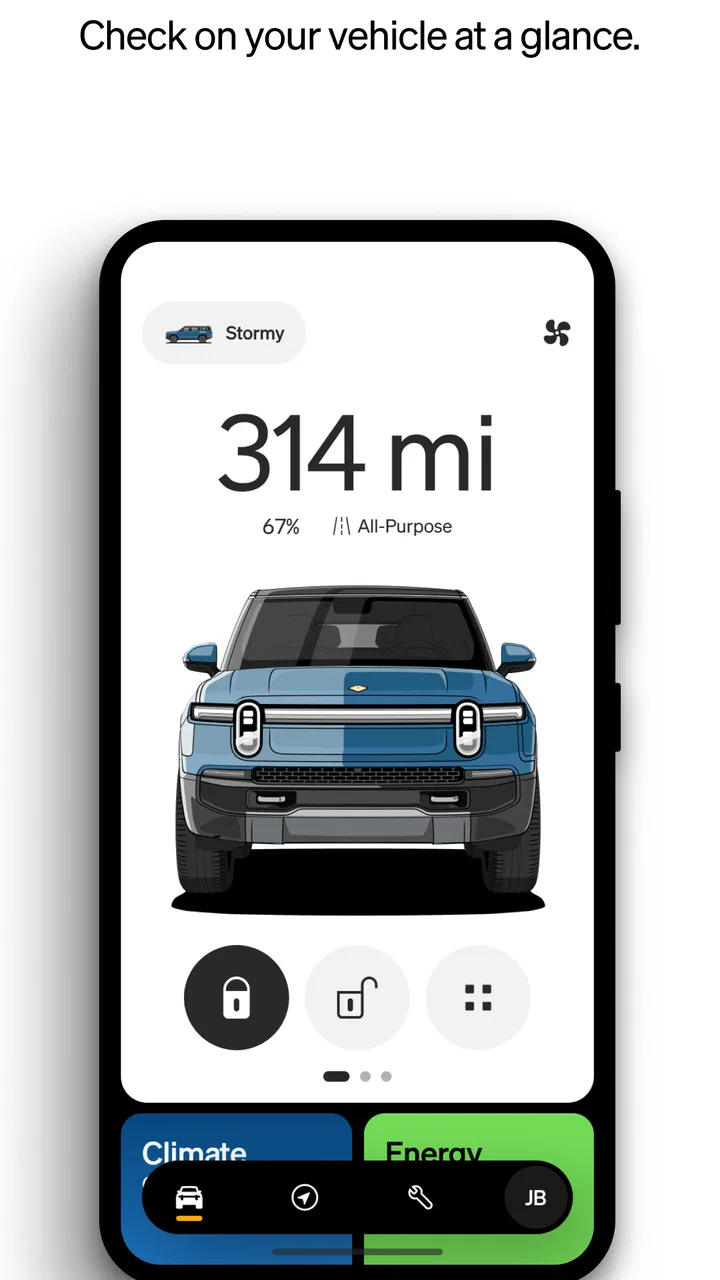
During an ordinary first-week scenario, I can imagine checking the app before leaving home, especially when the vehicle is parked somewhere unfamiliar or when I am preparing for a longer trip. The benefit is not necessarily one dramatic feature; it is the convenience of having vehicle-related information and actions associated with the same account. That kind of convenience is easy to overlook until the alternative is opening several unrelated services and trying to remember which one handles which task.
Another early strength is psychological rather than technical. A new vehicle creates uncertainty, even when the driver is comfortable with cars. A dedicated app gives the ownership experience a clear starting point. Instead of treating the vehicle as an isolated machine, I can see it as part of a connected relationship with Rivian. For a first-time electric-vehicle owner, that continuity may make the transition feel less fragmented.
Still, I would not confuse a polished first week with lasting usefulness. Early enthusiasm naturally makes almost any vehicle companion feel more important than it will later. The real test is whether the app continues to save time once the driver knows the vehicle, has settled into a charging routine, and no longer needs to explore every menu.
The right role beside other automotive apps
Rivian works best alongside, rather than instead of, the usual alternatives. I would still expect to use a preferred navigation service for route planning, a charging provider’s own app when that provider requires one, and perhaps a calendar or notes app for trip organization. The Rivian app’s role is narrower but more personal: it is the manufacturer’s channel for the vehicle and the ownership account.
This creates a practical trade-off. A general automotive app may support multiple brands and put broader information in one place, but it cannot offer the same brand-specific relationship. A Rivian owner who values one central connection to the vehicle may prefer this focused approach. Someone managing several cars from different manufacturers may find a multi-brand solution more convenient overall, even if it lacks Rivian’s dedicated feel.
The useful question is not whether Rivian replaces every car app; it is whether it removes enough small ownership hassles to deserve regular attention. In my view, the answer depends heavily on how often the owner interacts with the vehicle outside the driver’s seat. A person who regularly checks vehicle status, prepares for trips, or manages ownership details remotely has a stronger reason to keep it installed than someone who only wants directions and charging locations.
Month-to-month value after the novelty fades
After the first month, the app’s value becomes more selective. The initial discovery phase disappears, and I start judging it by recurring habits. Does it help me prepare for a drive? Does it reduce friction when I am away from the vehicle? Does it make ownership administration easier? If the answer is yes often enough, it earns a permanent place. If I open it only because I remember that it exists, it becomes another forgotten icon.
The strongest long-term case is routine. A Rivian owner may develop a pattern of checking the vehicle before leaving, reviewing information while away from home, or using the app as the first place to look when an ownership question appears. The app benefits from being associated with a specific vehicle, because repeated context is more useful than a generic dashboard that asks me to configure everything from scratch.
There is also value in reducing mental switching. When I am preparing for a trip, I may already be moving between navigation, weather, charging, and scheduling tools. A dedicated Rivian companion cannot eliminate that entire chain, but it can keep the vehicle-specific part in one familiar location. That is a modest benefit, yet modest benefits are exactly what determine whether an app survives on a phone over time.
My advice is to build a deliberate habit rather than checking it constantly. For example, I would use it during trip preparation and whenever I am away from the vehicle, but I would not turn it into a reflexive status-checking ritual. That approach preserves its practical value while avoiding the feeling that the app demands attention without giving anything meaningful back.
The public response suggests a mixed experience. Rivian currently carries an average rating of 3.2 from around 651 ratings, with about 297 written reviews. I would read that as a reason to keep expectations measured rather than as an automatic rejection. A connected vehicle app is judged not only by its interface but also by account state, vehicle communication, timing, and the owner’s specific situation. A smooth experience can feel invisible, while a single frustrating interruption can dominate the opinion of the whole product.
Its reach is still relatively modest, with over 50 thousand installs. That fits the app’s specialized purpose: it is not trying to serve every driver. The smaller audience can be a strength because the product has a clear identity, but it also means the experience is less relevant to anyone outside the Rivian ecosystem. I would not recommend installing it simply to browse a general automotive toolset.
Who gets lasting value from it
I think the best fit is a current Rivian owner who wants a manufacturer-specific mobile companion and is willing to keep a few complementary apps for navigation, charging, and travel. It is also relevant to someone moving into Rivian ownership who wants one familiar place to learn the connected side of the vehicle during the adjustment period.
The weaker fit is a driver who wants one application to manage several car brands, compare a wide range of charging networks, or provide a universal maintenance record. That person may be better served by a broader automotive platform, even if it feels less integrated with Rivian. Likewise, someone who rarely uses remote vehicle tools and prefers handling everything from inside the car may not gain enough recurring value to care about the app.
Because the app is free and rated for Everyone, trying it does not require a purchase decision. That makes experimentation easy, but free installation is not the same as guaranteed usefulness. I would judge it after a normal ownership cycle: a few routine drives, a trip-preparation session, and at least one moment when I need vehicle-related information while away from the car.
Maintenance burden and everyday friction
The maintenance burden is fairly simple in concept: keep the app current, keep the account connection healthy, and remember that a phone companion is only useful when it remains synchronized with the vehicle relationship. The current version is 3.9.0, so I would treat updates as part of normal ownership rather than something to avoid. Connected apps often depend on changes on both the phone and the manufacturer’s side, which makes staying current more sensible than holding onto an old version indefinitely.
That does not mean every update will feel rewarding. An update may matter most when something changes behind the scenes, while the visible interface looks almost the same. This can make maintenance feel like a chore because the benefit is preventative rather than exciting. My practical approach would be to allow ordinary updates, then judge the app by whether it remains dependable during the moments when I actually need it.
Account management is another overlooked part of the burden. A dedicated vehicle app is more sensitive to sign-in problems than a casual news or weather app because the account is tied to ownership. If I change phones, lose access to a sign-in method, or use multiple accounts carelessly, the resulting friction can feel more serious than a normal login inconvenience. I would set it up with the same care I use for any service connected to an important purchase.
Notifications deserve restraint. A vehicle companion can be helpful when it alerts me to something relevant, but unnecessary prompts quickly turn a useful tool into background noise. I would enable only the notifications that support a real habit and silence anything that makes me open the app without a clear reason. This is one of the easiest ways to protect its long-term value.
There is a broader maintenance issue too: the app cannot remove every dependency in the electric-vehicle routine. I may still need separate charging accounts, route planning, and travel tools. That is not necessarily a flaw in Rivian, but it does affect the total effort of ownership. The dedicated app simplifies the Rivian-specific layer; it does not magically turn the entire journey into one unified workflow.
Three practical habits that improve the experience
- Use it as a preparation tool. Open it before leaving for an unfamiliar destination, when the vehicle’s location or condition matters, or when I need to organize the vehicle side of a trip before switching to navigation.
- Keep the app’s role narrow. Let Rivian handle the manufacturer-specific relationship while using the best separate service for directions or charging. Trying to force one app to do everything usually creates more frustration.
- Review notifications after setup. A quiet, purposeful notification setup makes the app feel like an assistant rather than another source of interruptions.
These habits are not flashy, but they address the main reason a connected vehicle app becomes tiring: the user expects it to solve every automotive need, then feels disappointed when it does not. I get more from Rivian when I treat it as a focused companion with a clear job.
Where fatigue starts
The first source of fatigue is repetition without a clear payoff. If I already know the vehicle’s routine and rarely need remote information, opening the app can become an unnecessary extra step. The more familiar I become with the car, the more the app has to prove that it saves time rather than simply displaying a digital version of ownership.
The second is fragmentation. Even a well-focused manufacturer app exists beside other services. When I am planning a long drive, I may move between route planning, charging, weather, and vehicle tools. Rivian can be useful within that chain, but it does not eliminate the chain. Users who strongly prefer a single all-purpose app may find this arrangement tiring.
The third is the emotional effect of reliability problems. A small delay or failed connection is more irritating when the app represents a vehicle I depend on. I am more forgiving of a casual app that needs a second attempt than of a vehicle companion that I opened for a specific reason. This is why the mixed rating deserves attention: the app’s usefulness is closely tied to how confident I feel when I need it.
There is also a risk of overchecking. Connected vehicle apps can encourage owners to look at information simply because it is available. That may be interesting during the first week, but it rarely creates lasting value. I would rather use Rivian at meaningful points in my routine than let it become a source of low-level digital anxiety.
For non-owners, fatigue arrives even faster. The app’s identity is tied to Rivian, so its specialized focus is not a benefit unless I have a genuine reason to be part of that ecosystem. A general car app, a navigation service, or a charging-network app will usually offer more immediate value to someone without a Rivian vehicle.
My long-term verdict
Rivian earns lasting space on my phone when I treat it as a focused ownership companion, not as the definitive app for every automotive task. Its best quality is the direct connection between the Rivian brand, the vehicle, and the owner’s mobile routine. That connection feels especially useful during the first weeks and whenever I need to handle vehicle-related preparation away from the driver’s seat.
Its weaker side is equally clear: the value can become occasional, the broader driving workflow still involves other apps, and any reliability or account friction feels unusually important because the app is associated with a major piece of personal equipment. I would not keep it installed merely because it came with the ownership experience. I would keep it if my real routine includes enough moments where the dedicated connection saves effort.
Rivian was released on September 17, 2021, and the current version is 3.9.0. Those details place it in an established, continuing product rather than a brand-new experiment, but I still think the right decision is personal and practical. The free price lowers the barrier to trying it, while the Everyone age rating makes it broadly accessible. Neither fact changes the central question: will I use its vehicle-specific role month after month?
My recommendation is positive for Rivian owners who want a direct mobile link to their vehicle and are comfortable using separate tools for the rest of the driving experience. I would skip it if I wanted a multi-brand dashboard, a universal charging solution, or a complete replacement for every automotive service. For the right owner, it can become a quiet, useful part of the routine. For everyone else, the novelty is likely to fade before the app earns a permanent place.
In short, Rivian is most successful when it stays in its lane. I would use it to support ownership, prepare for real trips, and reduce small moments of uncertainty—not to replace the entire collection of apps that modern driving requires. That focused role gives it a credible long-term purpose, provided the owner’s everyday habits actually make use of it.
FAQs for Rivian
01What platforms is the Rivian app available on?
The Rivian app is available for both Android and iOS devices. Users can download the app from the Google Play Store for Android devices or the Apple App Store for iOS devices. Ensure your device meets the minimum operating system requirements to install and run the app smoothly.
02What features does the Rivian app offer?
The Rivian app provides a range of features including vehicle status monitoring, charging station locations, trip planning, and remote vehicle control. Additionally, it offers over-the-air updates, navigation assistance, and the ability to schedule service appointments directly from the app.
03How do I set up the Rivian app with my vehicle?
To set up the Rivian app with your vehicle, first download and install the app on your smartphone. Create an account or log in, then follow the on-screen instructions to connect the app to your Rivian vehicle. You may need your vehicle's identification number (VIN) to complete the setup process.
04Is the Rivian app free to use?
Yes, the Rivian app is free to download and use. However, some features may require an active subscription or be available only to Rivian vehicle owners. Always check within the app for any in-app purchases or subscription details to access premium features.
05Can I use the Rivian app to find charging stations?
Absolutely! The Rivian app includes a comprehensive map of charging stations, helping users locate the nearest chargers. It also provides real-time information on charger availability and supports route planning to ensure you can efficiently reach your destination with adequate charging stops.
Pros
- Sleek and intuitive user interface.
- Comprehensive vehicle control features.
- Real-time vehicle status updates.
- Customizable notification settings.
- Seamless integration with smart devices.
Cons
- Limited compatibility with older devices.
- Occasional syncing issues reported.
- High data usage for real-time features.
- Some features require a stable internet.
- No offline mode for certain functions.

Rivian
Gallery